
Module 6 — JavaScript Language Foundations
Values, types, variables, operators and your first decisions, all in the Console.
Time: about 105 minutes (estimate)
About this module
What this module covers
You learn values and types, const and let, operators, comparisons, and if/else. These are the moves behind every interactive feature: store a value, compare it, decide. They are also where most early bugs come from, so you cause each one on purpose to learn to recognize it.
Tips for the learner
Some prompts ask you to explain code to yourself, out loud. Others ask you to write something down. Each habit does a different job.
Recite to understand. When a prompt says “out loud,” explain the code in your own words, as if you were teaching it. Saying it aloud makes a deeper impression than reading silently. It helps you picture how the pieces of code fit together. And it shows you right away which line you cannot explain yet. That line is the one to review.
Write it down to check yourself. When a prompt says “write down,” it is usually a prediction, a choice, or a guess about a bug. A written answer can’t change after you see the result, so the comparison is fair and you learn from the difference. Writing also keeps your attention on the lesson and helps you pick out the main points.
Keep one notebook for this course. Use it for your predictions, key terms, steps, mistakes, and questions to come back to. Date each entry and write the module number, so you can find it later. Before you start a new module, read your last few entries and recite one or two of them out loud.
The four badges
Every core concept moves through the same four steps, called IEIA. Each step is marked with its badge.
 - Introduce (a lightbulb: a new idea) - You meet the concept: its name, and why it matters to you, in a sentence or two.
 - Explain (a speech bubble: the idea in words) - How it works, one idea at a time, in plain words.
 - Illustrate (an eye: see it) - A small example you can look at: a code snippet, a real screenshot or a diagram. Its caption, which starts with this badge, tells you what to notice.
 - Apply (a keyboard: your turn) - A short task to do right now, before you read on. Often you type or predict something; sometimes you write it down, sketch it, or explain code to yourself out loud.
Contents
- Why this matters
- Before you start
- Core concepts
- Exercise
- Project (in the full packet)
- Common misconception
- Summary
- Check your understanding
- Before next module
- Go further
- What to keep
In this module you will learn:
- What a value is, and the five basic types in this module: string, number, boolean, undefined and null
- How
typeoftells you a value’s type, including the odd result fornull - How to store values with
constandlet, and why this course does not usevar - The difference between assignment (
=) and comparison (===) - The arithmetic operators, and why
+behaves differently with text - The comparison operators, and why
===is safer than== - That every comparison produces a Boolean:
trueorfalse - How
if,else ifandelsechoose which code runs
Why this matters
Every interactive thing on a web page comes down to a few small moves. Store a value. Compare it with something. Decide what to do. A dark-mode switch, a form check, a gallery’s Next button: all of them do exactly that. This module teaches those moves on their own, in the Console and in Node, with no page to distract you.
Most early JavaScript bugs come from the topics in this module. Text that looks like a number but is not one. A single = where you meant to compare. A == that says two different things are equal. You will cause each of these on purpose, so you recognize them later when you did not mean to.
As in Module 5, nothing touches your site yet. Every result in this post was produced by running the code, and you will run the same code yourself.
Before you start
- Finish Module 5. You should be able to run
node hello.jsin yourpractice-05folder and open the Console with Ctrl+Shift+J. - In your course folder, create a new folder called
practice-06, next topractice-05. - Open
practice-06in VS Code with File → Open Folder…. - Open a terminal in it.
- Open Edge or Chrome. Press F12 (or Ctrl+Shift+J) to open DevTools, then click the Console tab. Keep it beside VS Code; you will switch between them.
Checkpoint. You have a terminal whose prompt ends in
practice-06>and a browser Console with a blinking cursor next to>.
Core concepts
1. What are values and types?
A value is one piece of data: a word, a number, yes or no. Every value has a type, and the type decides what you can do with it.
Five types cover almost everything in this course. (JavaScript has three more: objects, which you will meet in Module 8, and BigInt and Symbol, which this course does not use.) A string is text, always inside quotes: "hello", "42". A number is a number with no quotes: 42, 3.5. A boolean is true or false. undefined means a variable has no value yet. null means “nothing here,” on purpose; you assign it yourself. The typeof operator tells you the type, as a string. (An operator is a symbol or a word, such as + or typeof, that does a built-in job with the values next to it.) One result looks wrong: typeof null gives "object". MDN’s typeof page explains it as a leftover from the first version of JavaScript; a fix was proposed for the language, but it was rejected. Remember it as a known exception.



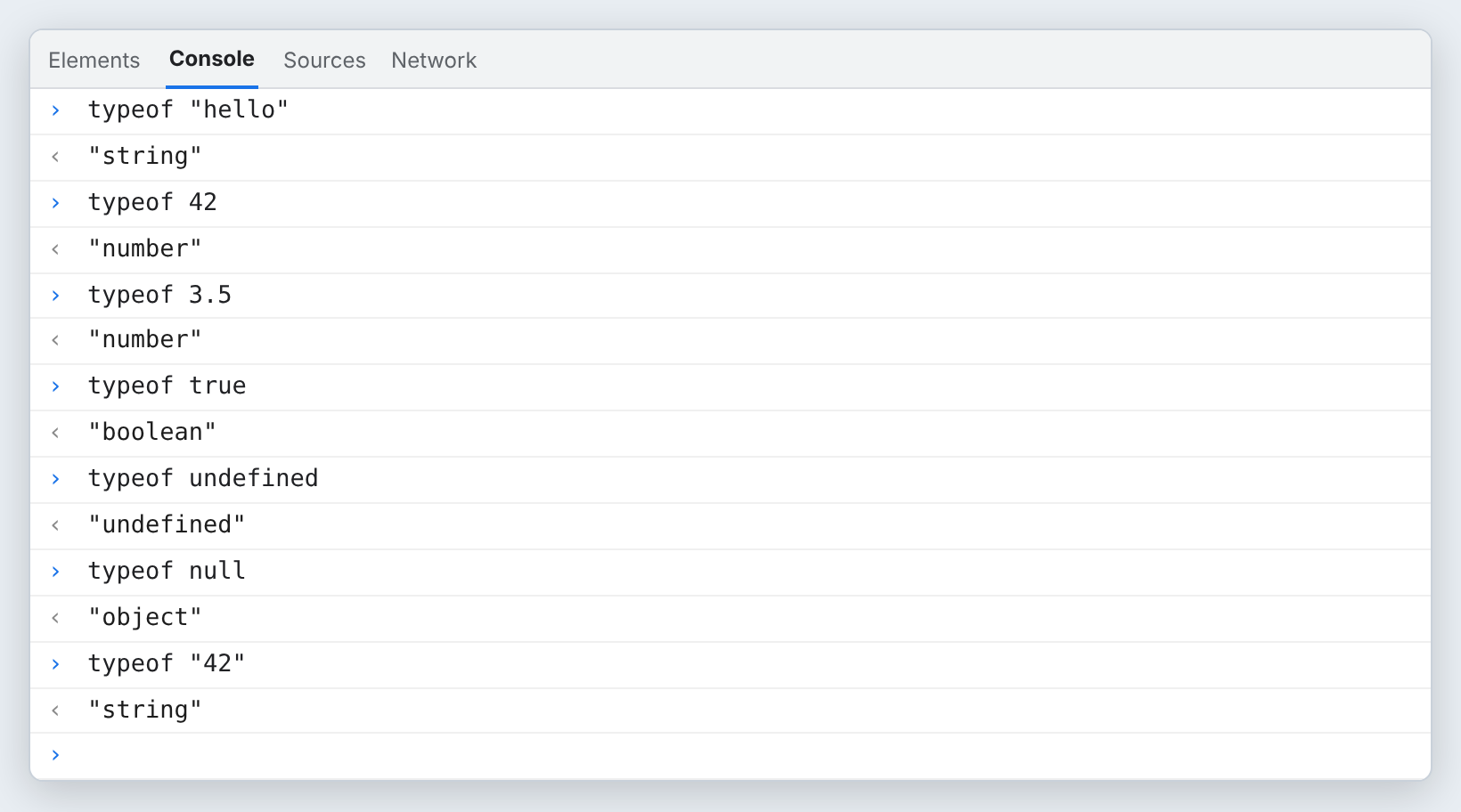
Look at the last line: "42" is a string, not a number, because of the quotes. And typeof null really is "object". As in Module 5, your Console may show text in single quotes, such as 'string'; both mean text. (real output, rendered; evaluated in Chromium)
In the Console, type typeof "true". Predict first: quotes or no quotes?
2. How do you store a value: const or let?
A variable is a name that holds a value. You create one with const or let. Creating a variable is called declaring it.
Use const when the name should always hold the same value, and let when it needs to change. MDN’s const page says a constant’s value “can’t be changed through reassignment.” Reassignment means giving a name a new value with = after you created it. Start with const every time; switch to let only when you find you need to change it. A let with no value holds undefined until you give it one. You will also see var in older code and tutorials. It follows older rules about where a name can be used (an idea called scope, which Module 7 explains), and those rules cause surprises. This course uses only const and let.
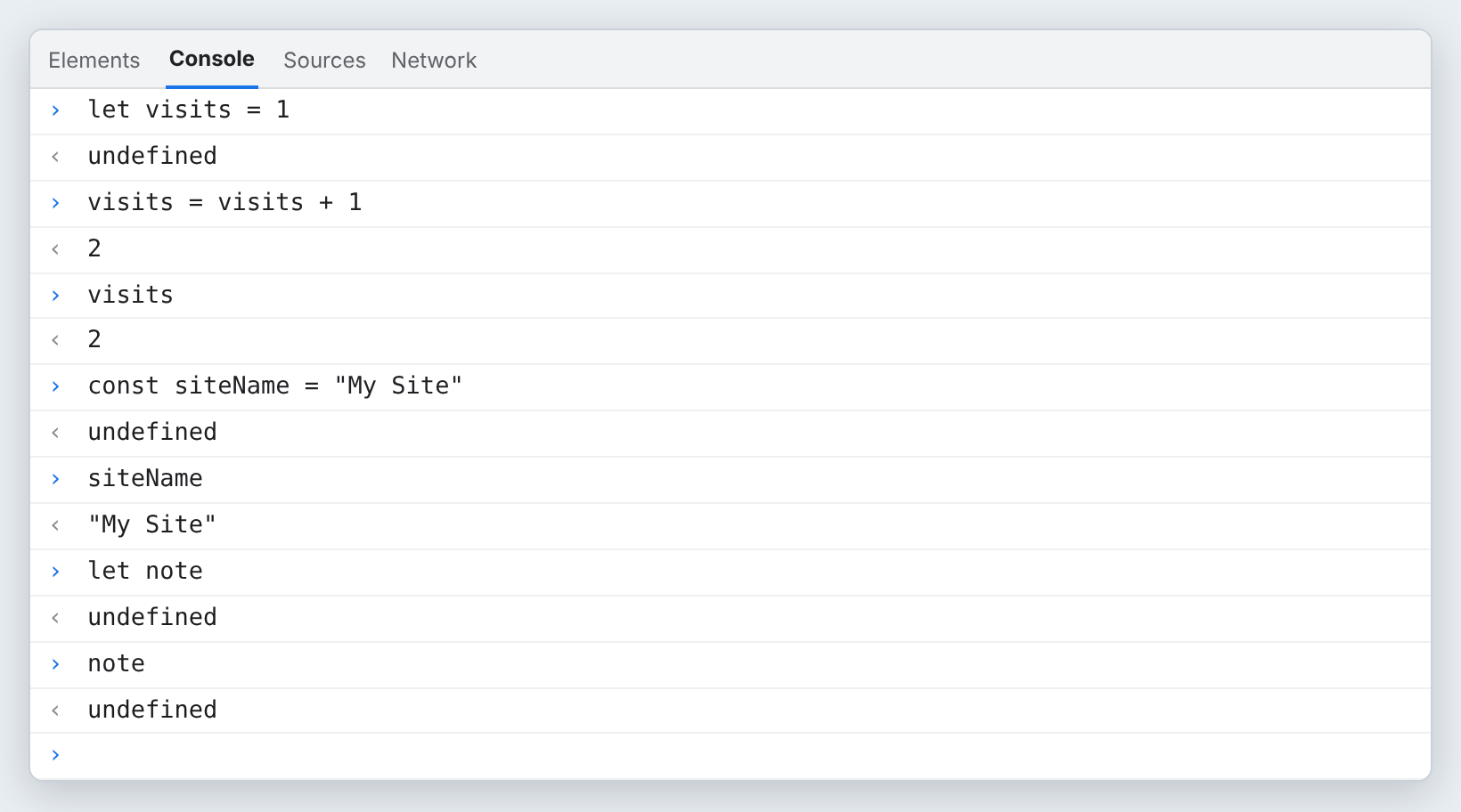
Declaring a variable shows undefined: the Console reports that the declaration itself has no value, just as with console.log() in Module 5. visits = visits + 1 reads the right side first (1 + 1), then stores 2. (real output, rendered; evaluated in Chromium)
What value does this variable hold? After let count = 5; and count = count + 10;, what is in count? Type it to check.
3. What is the difference between = and ===?
One = assigns: it puts a value into a variable. Three === compare: they ask whether two values are the same.
Read mood = "busy" as “mood becomes busy.” Read mood === "busy" as “is mood busy?” The first changes the variable. The second only asks a question and answers true or false. Mixing them up is one of the most common beginner mistakes, because in math class = meant “is equal to.”
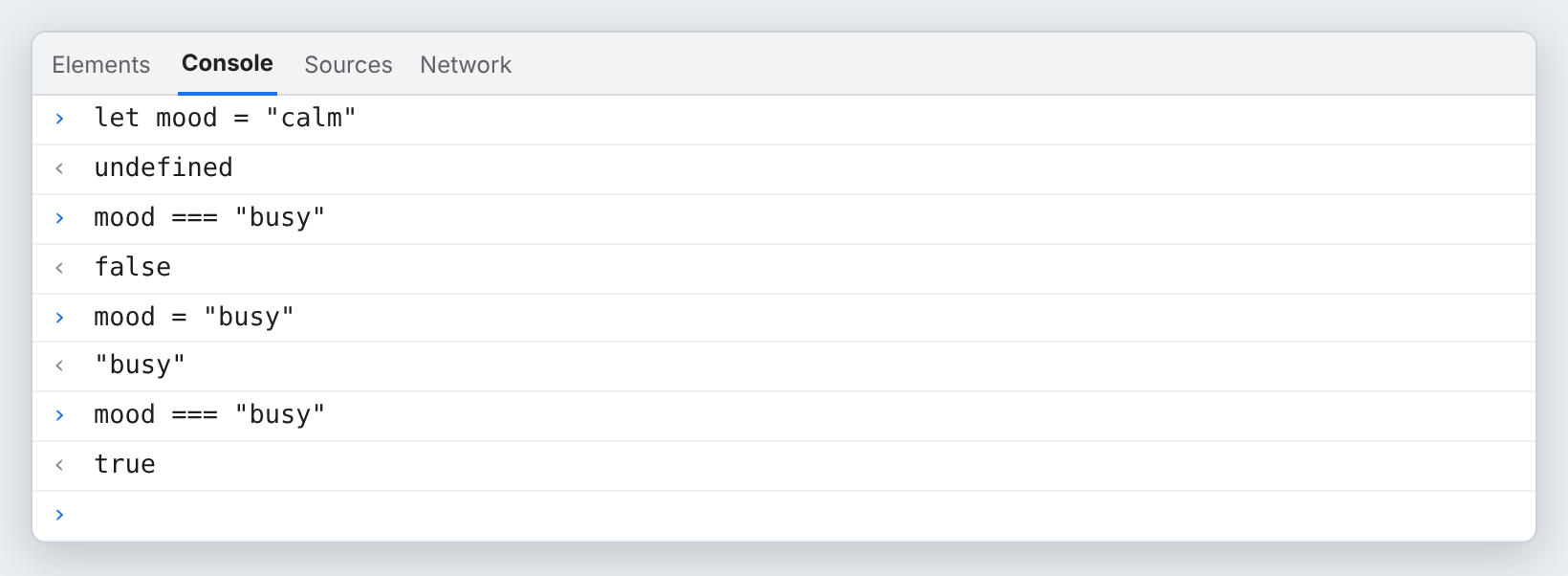
The comparison does not change mood. Only the assignment on the third line does. (real output, rendered; evaluated in Chromium)
Explain each line of the image to yourself, out loud, using “becomes” for = and “is it…?” for ===.1
4. How does arithmetic work, and why is + different?
JavaScript has the arithmetic you know: +, -, * (multiply), / (divide), plus %, which gives the remainder after dividing. The remainder is what is left over when one number does not divide evenly into another: 7 divided by 2 is 3 with 1 left over, so 7 % 2 is 1.
+ has two jobs. With two numbers it adds. If either side is a string, it joins them into one longer string, so "5" + 3 is "53". The other operators only do math, so JavaScript turns the text "5" into the number 5: "5" - 3 is 2. JavaScript also works from left to right. In "Total: " + 2 + 3, it first joins "Total: " and 2, then joins 3. Parentheses force the math to happen first.
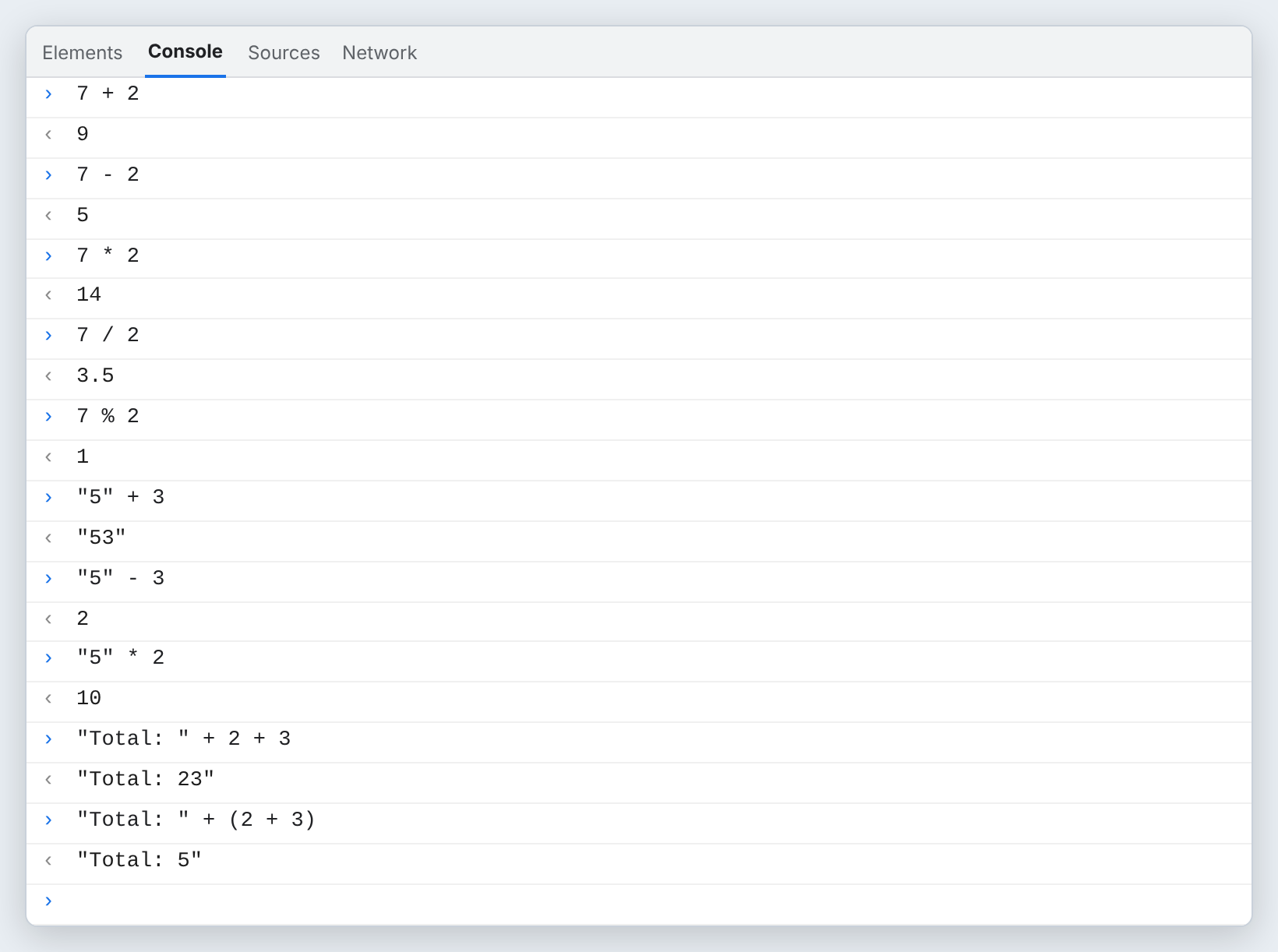
Watch the quotes on the results: "53" and "Total: 23" are strings; 2 and 10 are numbers. (real output, rendered; evaluated in Chromium)
Predict 10 % 3 and "10" + 1. Then type both.
5. How do comparisons work, and why === instead of ==?
Comparison operators ask a question about two values: >, <, >=, <=, === (same), !== (not the same).
There are two kinds of “equal.” === is strict: MDN’s Strict equality page says it “always considers operands of different types to be different.” (Operands are the values an operator works on: here, the value on each side of ===.) == is loose: if the types differ, it “attempts to convert them to the same type before comparing.” That is why 5 == "5" is true and 0 == false is true. Loose equality hides type mistakes, so this course always uses === and !==.
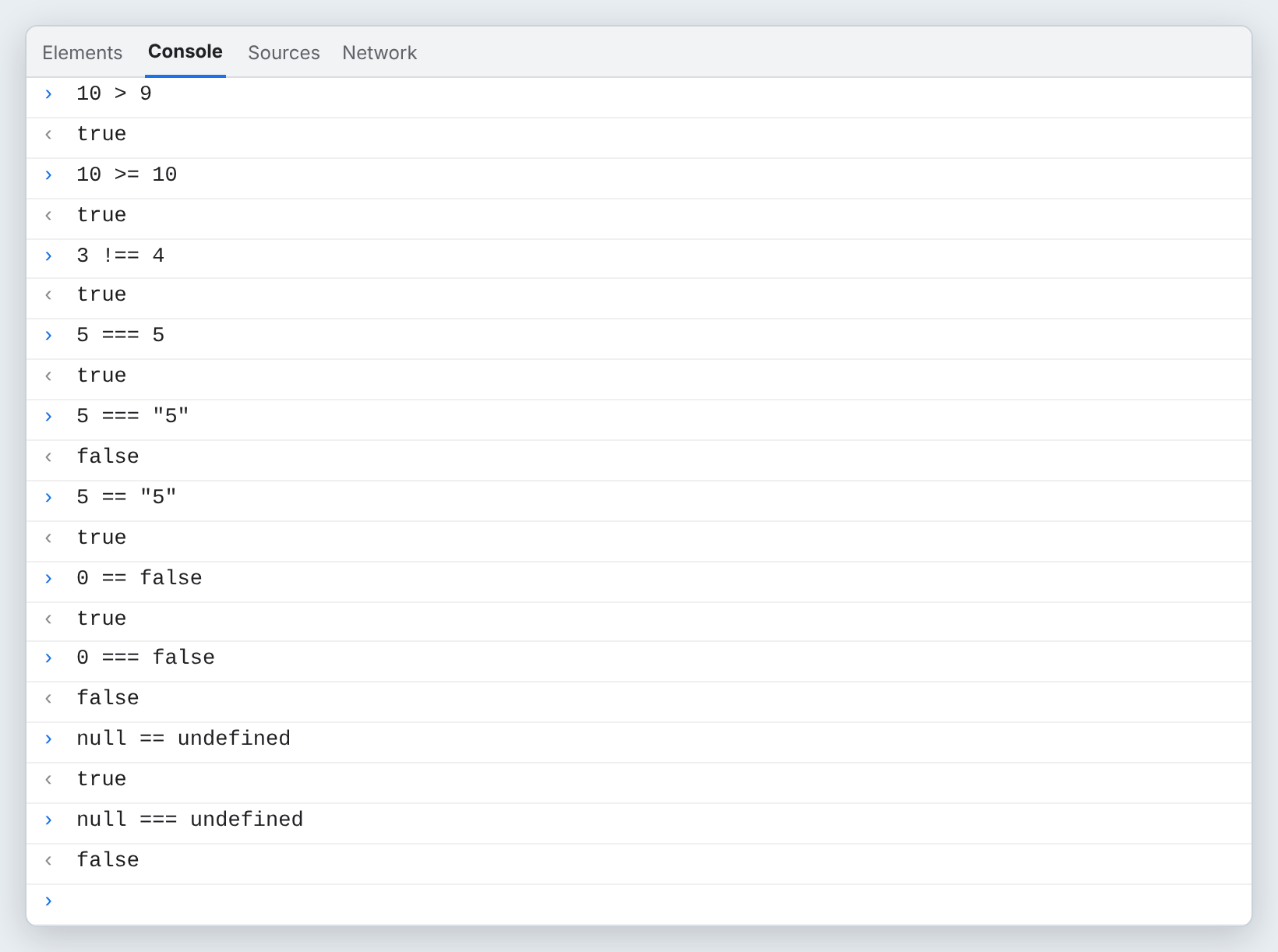 *Every pair of `==` and `===` lines gives opposite answers. Strict equality is the one that agrees with what you can see. (real output, rendered; evaluated in Chromium)*
Quick reference: every operator so far. Keep this table open while you do the Exercise. Each result was evaluated in Chromium.
| Operator | What it does | Example | Result |
|---|---|---|---|
= |
Assigns: puts a value into a variable | mood = "busy" |
mood now holds "busy" |
+ |
Adds two numbers | 7 + 2 |
9 |
+ |
Joins, if either side is a string | "5" + 3 |
"53" |
- |
Subtracts | 7 - 2 |
5 |
* |
Multiplies | 7 * 2 |
14 |
/ |
Divides | 7 / 2 |
3.5 |
% |
Gives the remainder after dividing | 7 % 2 |
1 |
=== |
Asks: the same value and the same type? | 5 === "5" |
false |
!== |
Asks: not the same? | 5 !== "5" |
true |
> |
Asks: greater than? | 10 > 10 |
false |
>= |
Asks: greater than, or equal? | 10 >= 10 |
true |
< |
Asks: less than? | 10 < 10 |
false |
<= |
Asks: less than, or equal? | 10 <= 10 |
true |
typeof |
Names the type of a value | typeof 7 |
"number" |
Predict "7" === 7 and "7" == 7 before you type them.
6. What does a comparison produce?
Every comparison produces a Boolean: true or false.
A Boolean is a value like any other. You can store it in a variable, log it, and check its type. Naming such a variable as a yes-or-no question, like needsJacket or isOpen, makes code easier to read. This matters for the next concept: if runs its code when the value inside its parentheses is true.
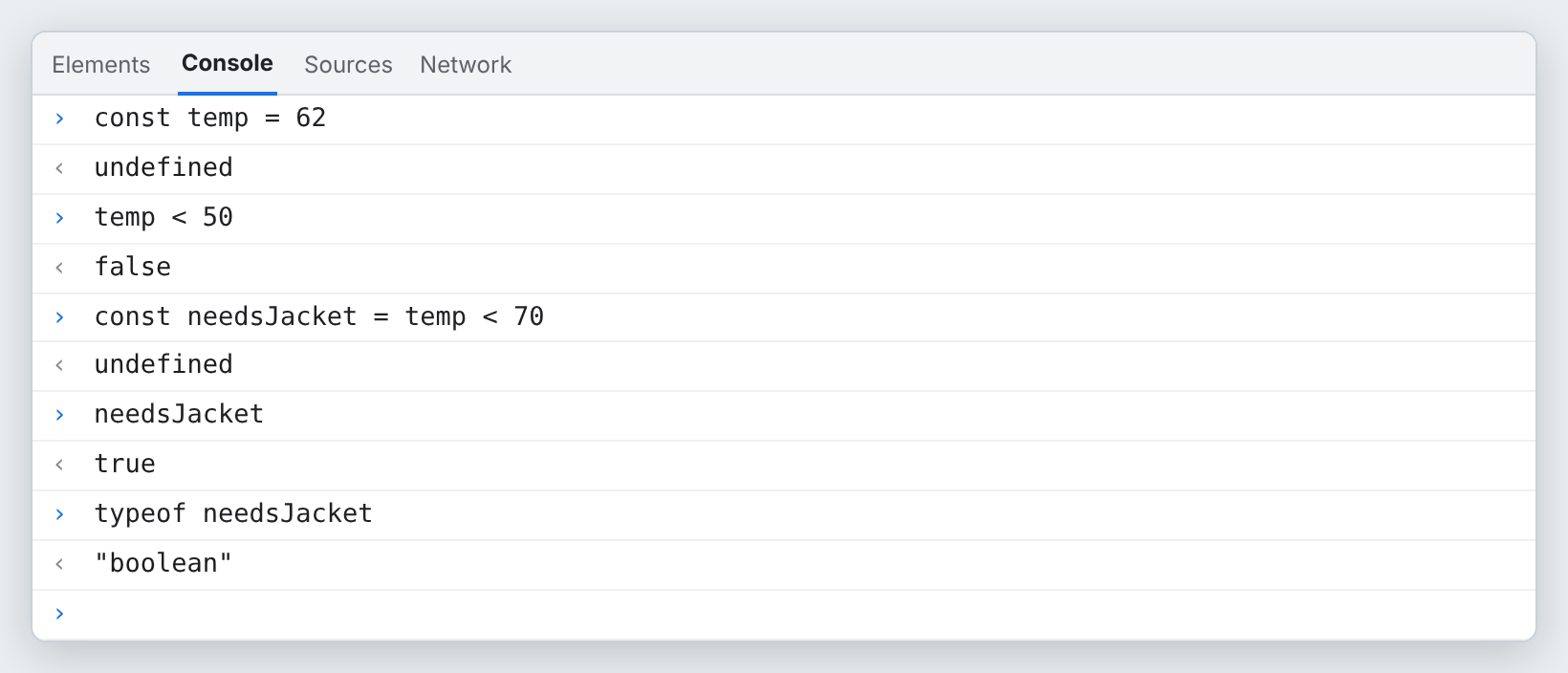
The comparison temp < 70 was worked out once and its answer, true, was stored. (real output, rendered; evaluated in Chromium)
More comparisons and the Boolean each one produces. Read the last column before you move on. Each result was evaluated in Chromium.
| Comparison | Result | Why |
|---|---|---|
10 > 9 |
true |
10 is more than 9 |
10 > 10 |
false |
Equal is not greater |
10 >= 10 |
true |
>= also says yes to equal |
9 < 10 |
true |
9 is less than 10 |
10 <= 10 |
true |
<= also says yes to equal |
5 === 5 |
true |
Same type, same value |
5 === "5" |
false |
A number and a string are different types |
5 !== "5" |
true |
They are not the same, so “not the same?” is true |
"yes" === "yes" |
true |
The same letters, in the same order |
"Yes" === "yes" |
false |
A capital letter and a small letter are different characters |
The rows with 10 on both sides are boundary cases: the value sits exactly on the edge the comparison tests. They are the rows people get wrong, and the Exercise ends with practice on them.
Write a line that stores whether a number is greater than 100, with a question-style name. Check its typeof.
7. How does a program make a decision?
if runs a block of code only when a condition is true. A condition is the question inside the parentheses, such as temp < 50. A block is the group of lines between { and }. else if adds another condition to check. else catches everything left over.
JavaScript checks the conditions from top to bottom and runs the block for the first one that is true. Then it skips the rest and carries on after the last }. At most one block runs. Order matters: in the script below, temp < 70 can only be reached when temp < 50 was false, so the second block means “50 to 69.” The code inside each block is indented two spaces so you can see what belongs to it. VS Code uses four spaces by default (its Basic editing page: “4 spaces per Tab key”); that is fine too, because the spaces do not change what the code does. Careful: never put a semicolon right after if (...), or between a block’s closing } and else, even though Module 5 ends every statement with one. In if (temp < 50); { … }, the semicolon ends the if, so the block runs every time. If no else follows, you get no error message at all; if an else follows, Node stops with SyntaxError: Unexpected token 'else'. (A token is one piece of code, such as a word or a symbol.)
// weather.js: suggest what to wear from the temperature (degrees F)
const temp = 40;

if (temp < 50) {
  console.log("Wear a coat");
} else if (temp < 70) {
  console.log("Bring a jacket");
} else {
  console.log("T-shirt weather");
}

console.log("Checked " + temp + " degrees");
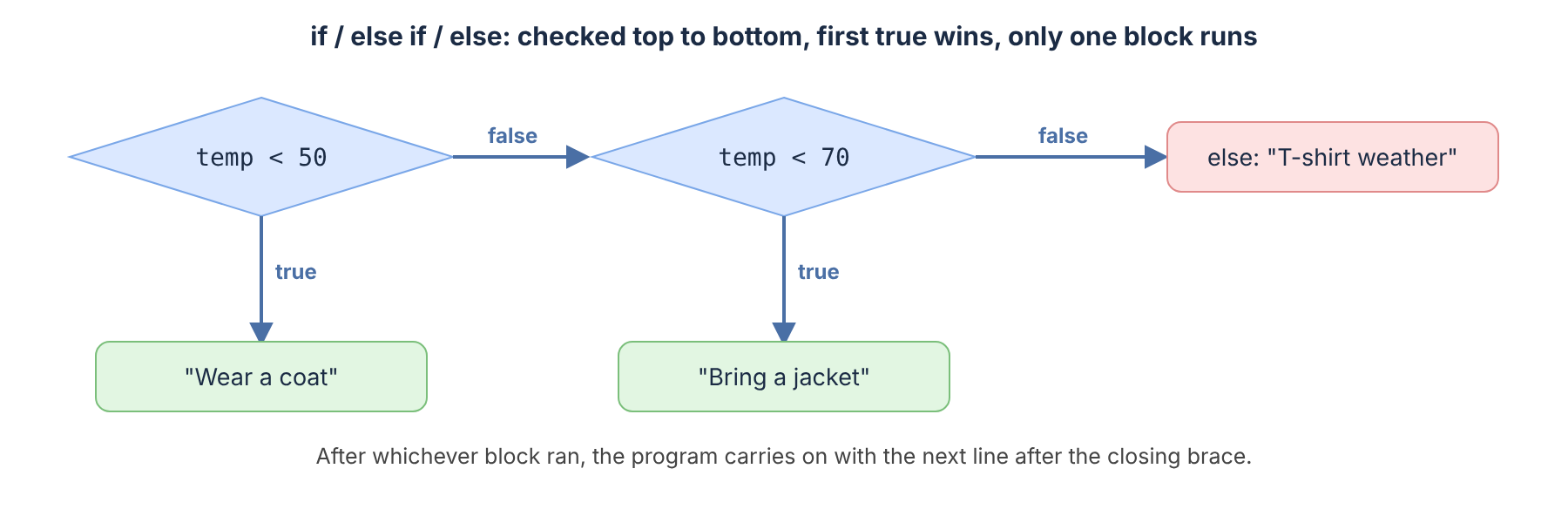
Checked top to bottom; the first true condition wins.
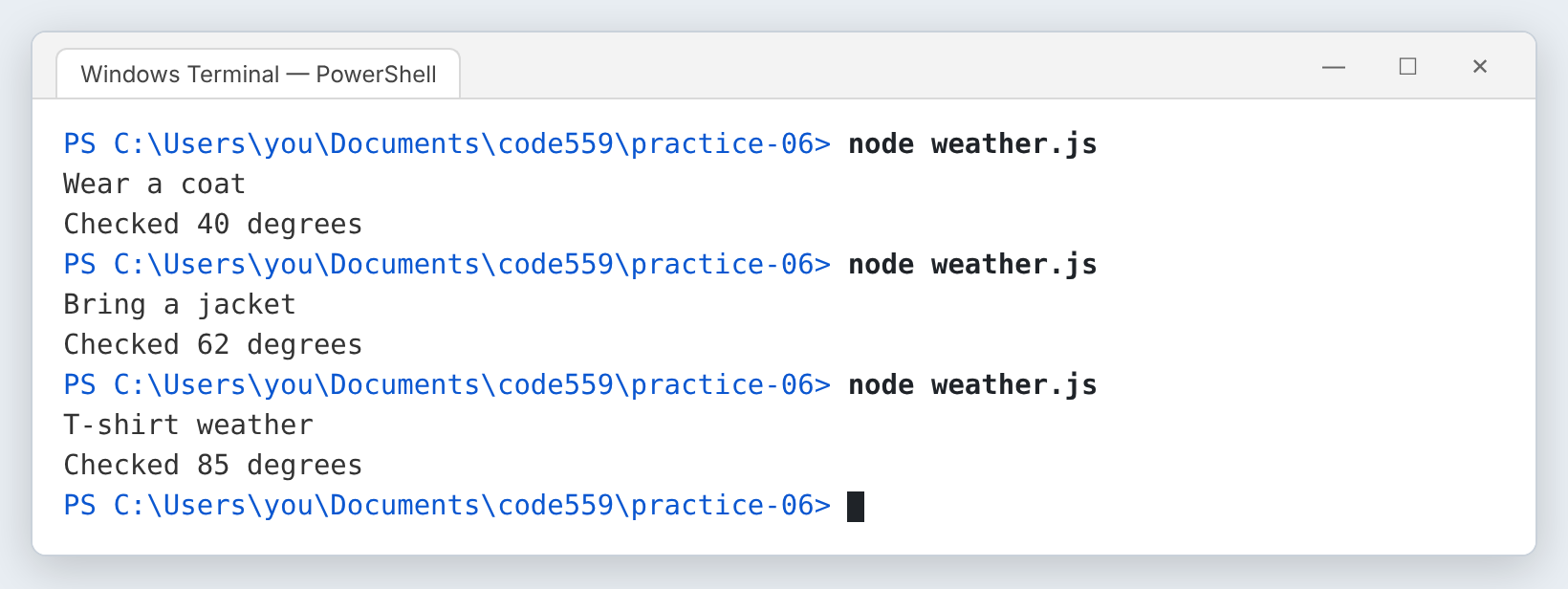
The file was edited and saved between runs, with temp set to 40, then 62, then 85. Each run printed exactly one suggestion, and the last line ran every time because it is outside the if. On Windows the output is the same. (real output, rendered; captured on Linux, with the folder path changed to the course folder)
Create weather.js in practice-06 and type the script above. Save, then run node weather.js in the terminal. It should print Wear a coat and Checked 40 degrees, like the first run in the image. What happens if this changes? Predict the output for temp set to 50 and to 70, and write your predictions down. Change the number on line 2, save and run again for each one. Those are the edges, and edges are where bugs live. (Check: 50 prints Bring a jacket, because 50 < 50 is false. 70 prints T-shirt weather, because 70 < 70 is also false.)
Exercise
Your hands, about 55 minutes (estimate). Type it, do not paste it. Work in the Console unless a step says otherwise.
-
Predict on paper. Copy the Type this column of this table and write your prediction next to each line. Do not run anything yet.
# Type this Your prediction a typeof "7"b typeof 7c "7" + 7d "7" - 7e 7 + 7 + "7"f "7" + 7 + 7g 10 / 4h 10 % 4i 7 == "7"j 7 === "7"k typeof (7 > 3)l typeof undefinedm typeof null -
Run. Type each line into the Console.
-
Mark each prediction right or wrong. Then check against the results we got in Chromium:
# Result # Result a "string"h 2b "number"i truec "77"j falsed 0k "boolean"e "147"l "undefined"f "777"m "object"g 2.5 -
For every one you got wrong, write one sentence on why. Lines e and f are worth the most time: they use the same three values in a different order.
-
Modify. Change line c to use
*instead of+. Predict, then run. -
Create. Write two variables of your own with
const, one a number and one a string that looks like a number. -
Write one comparison between them that is
truewith==andfalsewith===. -
Break it on purpose. In the Console type
const city = "Fresno"(or any city) and press Enter. -
Type
city = "Chicago"and press Enter. Read the error. Its name,TypeError, is new: it means JavaScript could not do what the code asked, often because a value has the wrong type or, as here, cannot be changed. -
Type
cityto see what it holds now.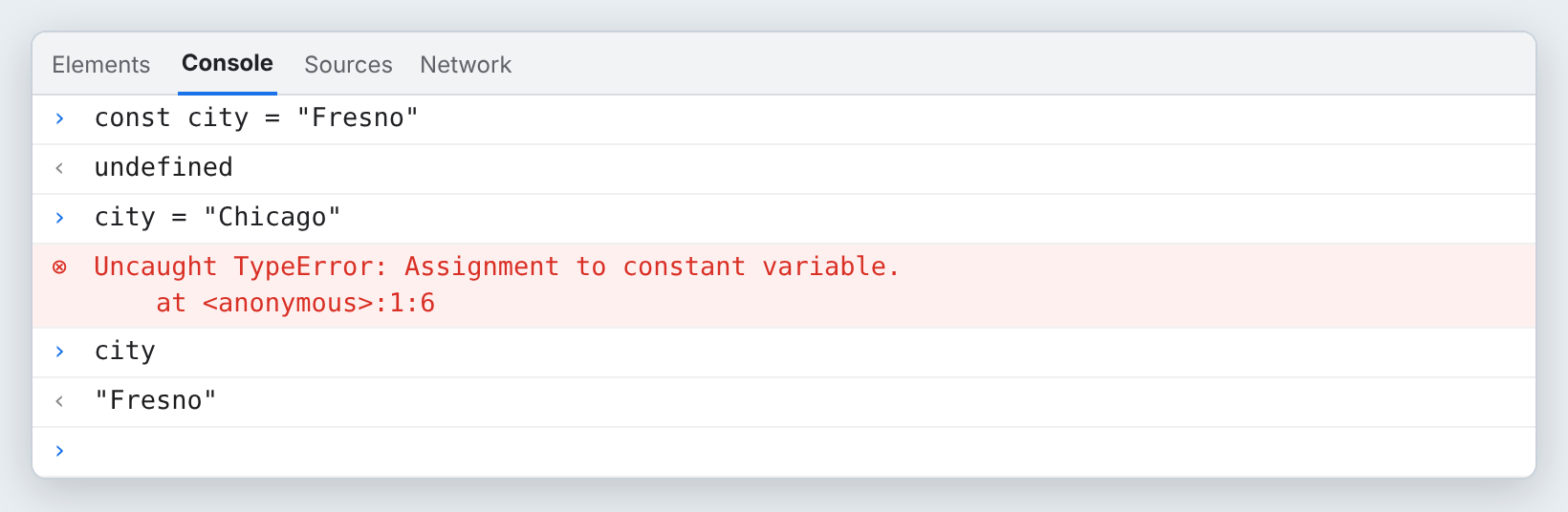
Name:
TypeError. Message:Assignment to constant variable.The value did not change. MDN’s const page notes the exact wording can differ between browsers; this is Chromium’s, the engine inside Edge and Chrome. (real output, rendered; evaluated in Chromium)One Console difference: the Console lets you type a whole
constline again to start over, soconst city = "Chicago"would work there. In a file, declaring the same name twice is an error: Node stops withSyntaxError: Identifier 'city' has already been declared. (An identifier is a name in your code, such as a variable’s name.) -
Same mistake in Node. Create
break-const.jsinpractice-06with these three lines and save:const city = "Fresno"; city = "Chicago"; console.log(city); -
Run
node break-const.js.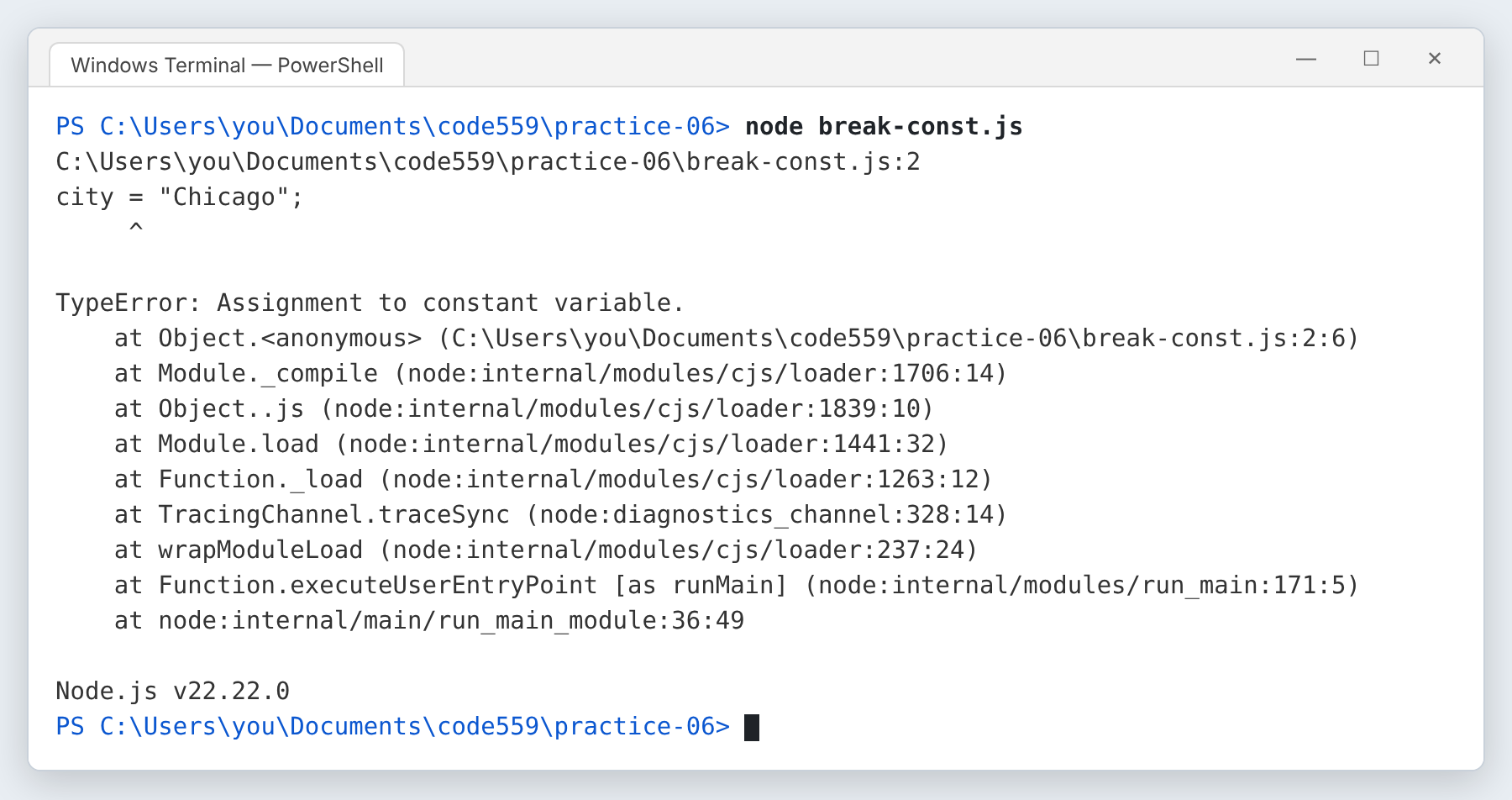
Same name and message as the Console, plus the file and line from Module 5’s error-reading routine. Line 3 never ran. Your own error shows the path to your own file. (real output, rendered; captured on Linux, with the folder path changed to the course folder)
-
Fix it by changing
consttoleton line 1. Run again and confirm it printsChicago. Then ask yourself whetherletwas the right fix, or whether the program should never have changed the city. -
Boundary:
<or<=? The rule is “children under 13 pay the child price.” Createticket.jsinpractice-06with these lines and save:// ticket.js: children under 13 pay the child price const age = 12; if (age < 13) { console.log("Child ticket"); } else { console.log("Adult ticket"); } -
Before you run it, write down what it will print for
ageset to12, to13and to14. -
Run
node ticket.jsfor each one, changing the number on line 2 each time. (Check:12printsChild ticket.13printsAdult ticket, because13 < 13is false.14printsAdult ticket.) -
Now change
<to<=and run all three again. Only one answer changes. Which one, and does the program still follow the rule? (Check:13now printsChild ticket, because13 <= 13is true. That breaks the rule, so put<back.) -
Find the boundary bug. The rule is “orders of $50 or more ship free.” Create
shipping.jswith these lines and save:// shipping.js: orders of $50 or more ship free const total = 50; if (total > 50) { console.log("Free shipping"); } else { console.log("Shipping: $5"); } -
Test three values:
49,50and51. First, for each one, write down what the rule says should happen. -
Run the script with each value and compare. One value gives the wrong answer. (Check:
50printsShipping: $5, but the rule says an order of exactly $50 ships free.) -
Fix it by changing one operator, and run all three values again. (Check: with
>=,49printsShipping: $5, and50and51both printFree shipping.) -
Write your own, and pick your own test values. The rule is “a library book is late after 14 days.” Create
late.js. -
Store a number of days in a
constcalleddays. -
Write an
ifand anelsethat printLateorOn time. -
Before you run anything, choose three test values: one just below the edge, the edge itself, and one just above it. Write down what the rule says for each.
-
Run all three. (Check: with
days > 14, the values13and14printOn timeand15printsLate. A book kept exactly 14 days is not late yet.)
Project (in the full packet)
The Project is a “plan my day” script. You set one number, the hour of the day from 0 to 23, and the script decides what to print: a different plan for the morning, the afternoon and the evening, plus a polite message when the hour makes no sense, like 25. You will choose your own time ranges, predict the output for the edge hours before you run them, and test every branch on purpose. The full brief, the step-by-step build, and the finishing work in Git are in the Module 6 packet. Get the packet → (opens in a new tab)
Common misconception
“
=means equals, like in math.”
What would you say? Hint: look at visits = visits + 1 in Core Concept 2. In math that line could never be true.
Summary
A value is one piece of data with a type, and this module’s five types are string, number, boolean, undefined and null; typeof names the type, and typeof null is "object" for historical reasons. const holds a value that will not be reassigned, let holds one that will, and this course does not use var. One = assigns; === compares. + adds numbers but joins strings, while -, *, / and % only do math. === treats different types as different; == converts them first, which hides mistakes. Every comparison produces a Boolean you can store and test. if, else if and else check conditions from top to bottom and run only the first block whose condition is true.
Check your understanding
-
Why is
"5" + 3equal to"53", but"5" - 3equal to2? -
A teammate writes
if (answer == 0). What would you change, and why? -
What value does this variable hold? After these lines, what is in
total, and what is its type?let total = "10"; total = total + 5;
Before next module
You should now be able to do these on your own:
- You can name this module’s five basic types and check any value with
typeof - You start every variable with
constand switch toletonly when it must change - You can explain
"5" + 3and"5" - 3without running them - You use
===and!==, never== -
weather.jsruns, and you tested the edge values 50 and 70 - You caused the const
TypeErrorin the Console and in Node and can read both - If you did this module’s packet project in my-site, saved it with the routine: git status → git add . → git commit -m “…” → git push → check the live page. (Your practice folder is not saved to GitHub.)
You have only been introduced to these so far:
- Objects, BigInt and Symbol. This module only named them. Module 8 teaches objects; this course does not use the other two.
varand scope. You read thatvarfollows older rules, but you did not use it. Module 7 explains local scope.nullas a value you assign yourself. You checkedtypeof null, but you did not storenullanywhere. Module 7 comes back to it, with functions that returnnullon purpose.- The stray semicolon after
if (...). You read what it does, but you did not cause it. - Writing your own
else ifchain. You typed one inweather.js, but the scripts you wrote in the Exercise used onlyifandelse.
Go further
- MDN: typeof (including the section on
typeof null) - MDN: const, let and var
- MDN: Strict equality (===) and Equality (==)
- MDN: Expressions and operators (the guide to every operator), and the reference pages for Less than (<), Less than or equal (<=), Greater than or equal (>=) and Remainder (%)
- MDN: if…else
- MDN: JavaScript error reference (for TypeError)
- freeCodeCamp: the free JavaScript Certification (checked 2026-10-11) has practice on this topic.
What to keep
Keep your filled-in prediction table, with a sentence beside every line you got wrong, and keep weather.js in practice-06. Then answer for yourself: which step would be hardest to repeat without this post, and why?
Code559 is a 559 Solutions project. Portions adapted from Visual Studio Code documentation (CC BY 3.0 US), GitHub Docs (CC BY 4.0), and GitHub Skills (MIT). Screenshots used with permission from Microsoft.
Sources checked 2026-10-09: MDN “typeof”; MDN “const”; MDN “let”; MDN “var”; MDN “Strict equality (===)”; MDN “Equality (==)”; MDN “if…else”; MDN “JavaScript error reference”. Checked 2026-10-11: MDN “Empty statement” (the semicolon after if); MDN “typeof” (the typeof null section); MDN “JavaScript data types and data structures”; VS Code Docs “Basic editing” (Indentation); ChromeDevTools/devtools-frontend on GitHub (ConsoleViewMessage.ts and StringUtilities.ts: Console results use single quotes). Checked 2026-10-12: Ozubko and MacLeod, “The Production Effect in Memory: Evidence That Distinctiveness Underlies the Benefit,” Journal of Experimental Psychology: Learning, Memory, and Cognition 36(6), 2010 (the footnote on saying code out loud). Checked 2026-11-17: every MDN link in “Go further” opened; MDN “Expressions and operators” (JavaScript Guide); MDN “Less than (<)”; MDN “Less than or equal (<=)”; MDN “Greater than or equal (>=)”; MDN “Strict inequality (!==)”; MDN “Remainder (%)”; MDN “Operator” (Glossary); MDN “Operand” (Glossary); MDN “Identifier” (Glossary); MDN “Block statement”; MDN “TypeError”; MDN “SyntaxError: Unexpected token”; MDN “Lexical grammar” (what a token is). Every row of the two new tables evaluated in Chromium 153 (headless, via Playwright); ticket.js, shipping.js and late.js run with every value shown in Node 22.23.4.
Footnotes
-
Why out loud? Most people have recited something to learn it by heart: a phone number, a poem, lines for a play. Words you say aloud stick better than words you read silently; memory researchers call this the production effect (Ozubko and MacLeod, 2010). Explaining code to yourself out loud uses the same idea. It also shows you the line you cannot explain yet, and that line is the one to study next. ↩