
Module 7 — Functions
Name a set of instructions once, hand it inputs, and get a value back you can test.
Time: about 2 hours (estimate)
About this module
What this module covers
You learn to define, call, test and return values from functions, including how to write one from a one-sentence description. It’s how working developers check their code: a function that hands back a value can be tested with made-up inputs before any web page exists.
Tips for the learner
Some prompts ask you to explain code to yourself, out loud. Others ask you to write something down. Each habit does a different job.
Recite to understand. When a prompt says “out loud,” explain the code in your own words, as if you were teaching it. Saying it aloud makes a deeper impression than reading silently. It helps you picture how the pieces of code fit together. And it shows you right away which line you cannot explain yet. That line is the one to review.
Write it down to check yourself. When a prompt says “write down,” it is usually a prediction, a choice, or a guess about a bug. A written answer can’t change after you see the result, so the comparison is fair and you learn from the difference. Writing also keeps your attention on the lesson and helps you pick out the main points.
Keep one notebook for this course. Use it for your predictions, key terms, steps, mistakes, and questions to come back to. Date each entry and write the module number, so you can find it later. Before you start a new module, read your last few entries and recite one or two of them out loud.
The four badges
Every core concept moves through the same four steps, called IEIA. Each step is marked with its badge.
 - Introduce (a lightbulb: a new idea) - You meet the concept: its name, and why it matters to you, in a sentence or two.
 - Explain (a speech bubble: the idea in words) - How it works, one idea at a time, in plain words.
 - Illustrate (an eye: see it) - A small example you can look at: a code snippet, a real screenshot or a diagram. Its caption, which starts with this badge, tells you what to notice.
 - Apply (a keyboard: your turn) - A short task to do right now, before you read on. Often you type or predict something; sometimes you write it down, sketch it, or explain code to yourself out loud.
Contents
- Why this matters
- Before you start
- Core concepts
- 1. What is a function?
- 2. What is the difference between defining and calling?
- 3. What is a parameter, and what is an argument?
- 4. What does
returndo, and why isconsole.log()not the same? - 5. What is local scope?
- 6. How do you test a function by itself?
- 7. How do you write a function from a one-sentence description?
- 8. What is the difference between
showMessageandshowMessage()? - 9. How does a function say “there is no answer”?
- Exercise
- Project (in the full packet)
- Common misconception
- Summary
- Check your understanding
- Before next module
- Go further
- What to keep
In this module you will learn:
- What a function is: a named, reusable set of instructions
- The difference between defining a function and calling it
- The difference between a parameter and an argument
- What
returndoes, and whyconsole.log()is not the same thing - Basic local scope: why a variable made inside a function cannot be seen outside it
- How to test a function by itself, with several inputs, in the Console and in Node
- A five-step method for writing a function from a one-sentence description
- The difference between a function reference (
showMessage) and a function call (showMessage()), and why event listeners in Module 9 need the first one (an event listener is a function the browser runs when something happens on the page, such as a click) - How to return
nullwhen there is no answer, and check for it with=== null
Why this matters
So far your JavaScript runs top to bottom, once. Every time you want the same work done again, you would have to type it again. A function fixes that. You write the steps once, give them a name, and run them whenever you want, with different inputs each time. An input is a value you hand to the function to work with.
There is a second reason, and it matters more. A function that hands a value back can be tested by itself. You can call it with three made-up inputs and check three answers before any web page exists. That is how working developers check their code, and it is the shape of almost every practice question and interview task you will meet: “write a function that takes this and returns that.”
This module stays in the Console and in Node. There is no web page yet. In Module 9 you connect functions to buttons, and the last concept here, reference versus call, is the bridge that makes that work.
Before you start
- Finish Module 6. You should be able to use
constandlet, compare values with===and<, and write anifstatement. - In your course folder (for example
Documents\code559), create a throwaway folder calledpractice-07. Nothing in it is published. - Open the
practice-07folder in VS Code with File → Open Folder…. - Open a terminal in VS Code with Terminal → New Terminal.
- Type
node --version. Anyvfollowed by numbers means Node is ready. - Open Edge or Chrome. Press F12 (or Ctrl+Shift+J) to open DevTools, then click the Console tab. Anything you type there runs at once and nothing is saved. Keep it open as your scratch pad.
Checkpoint. You have an empty
practice-07folder open in VS Code, a terminal whose prompt ends inpractice-07>, and a browser Console you can type into.
Core concepts
1. What is a function?
A function is a named, reusable set of instructions. You write the instructions once. After that, the name runs them.
A function definition has four parts. The keyword function says a definition is coming. (A keyword is a word that has a special meaning in JavaScript.) The name is how you run it later. The parameters in parentheses are names for the inputs. The body in curly braces is the work. The line that starts with return hands a value back.



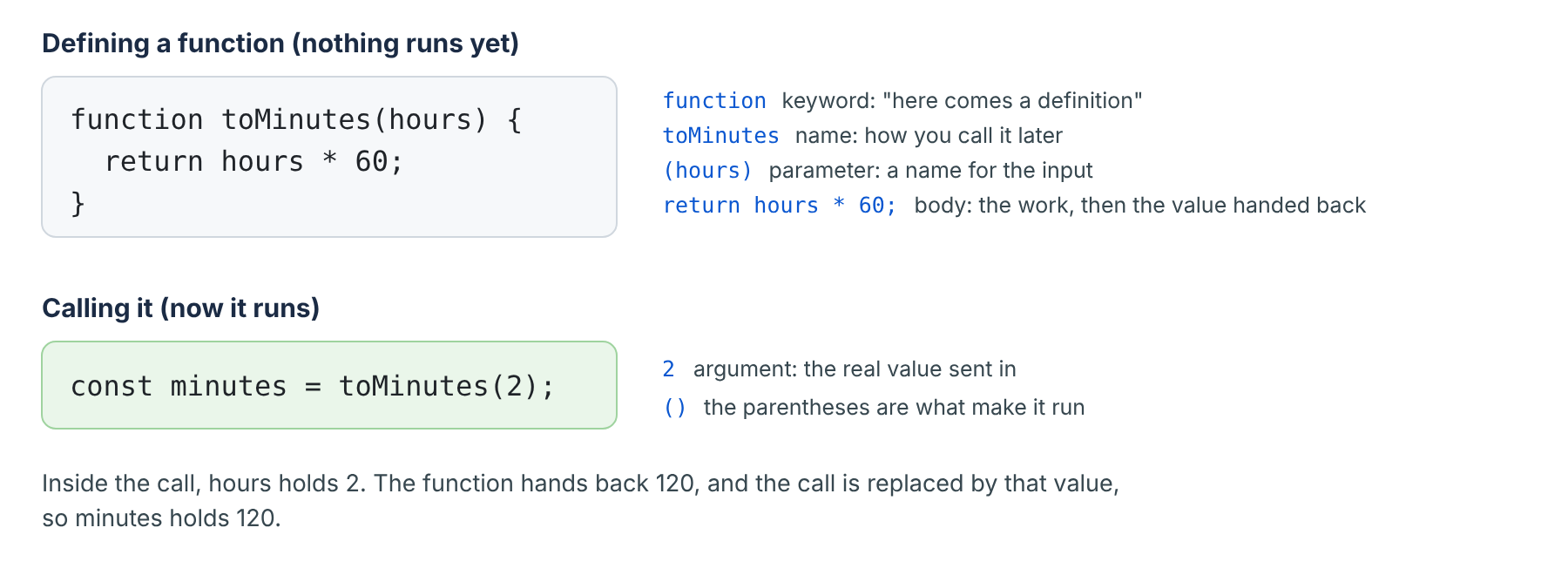
Top: the definition. Bottom: a call. The parentheses after the name are what make it run.
Point at each part of function toMinutes(hours) { return hours * 60; } and name it to yourself, out loud: keyword, name, parameter, body.1
2. What is the difference between defining and calling?
Writing a function down and running it are two separate steps. MDN’s Functions guide puts it this way: “Defining a function does not execute it.” To execute code means to run it.
When you define toMinutes, JavaScript stores the instructions under that name and does nothing else. When you call it, by writing the name followed by parentheses, toMinutes(2), the body runs. You can call one definition as many times as you like.
Typed into the Console for the picture below, in this order:
function toMinutes(hours) {
  return hours * 60;
}
toMinutes(2)
toMinutes(1.5)
toMinutes(0)
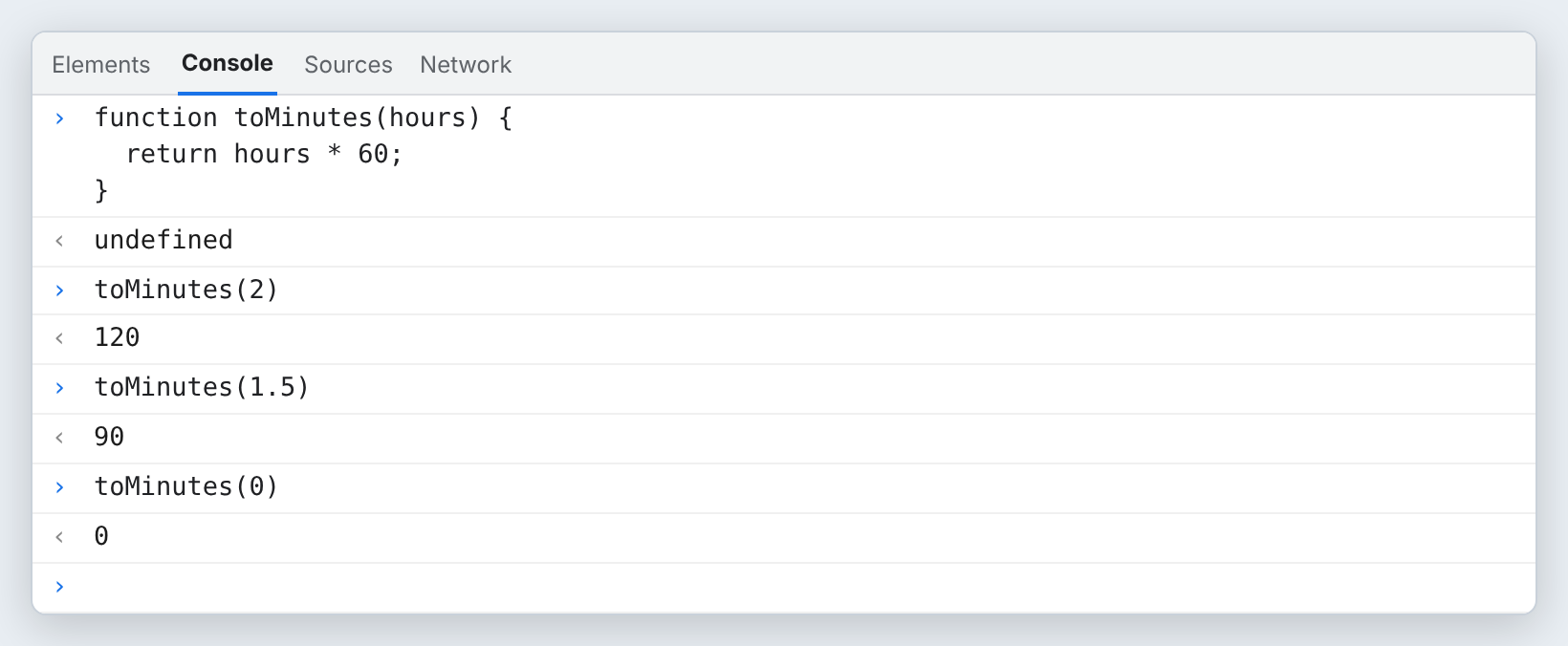
The Console prints undefined after the definition. That is its comment on the line you typed, not an answer from your function. The three calls each hand back a number. (real output, rendered)
Type the definition into your browser Console, then call it with toMinutes(3). Predict the answer before you press Enter.
3. What is a parameter, and what is an argument?
They are two words for the two ends of the same input.
A parameter is the name written in the definition: hours. An argument is the real value you give when you call: the 2 in toMinutes(2). When the call runs, the parameter works like a variable that was just set to the argument. Call it again with 1.5, and this time hours holds 1.5.
In the picture under Concept 1, hours is the parameter and 2 is the argument. Inside that one call, hours * 60 becomes 2 * 60.
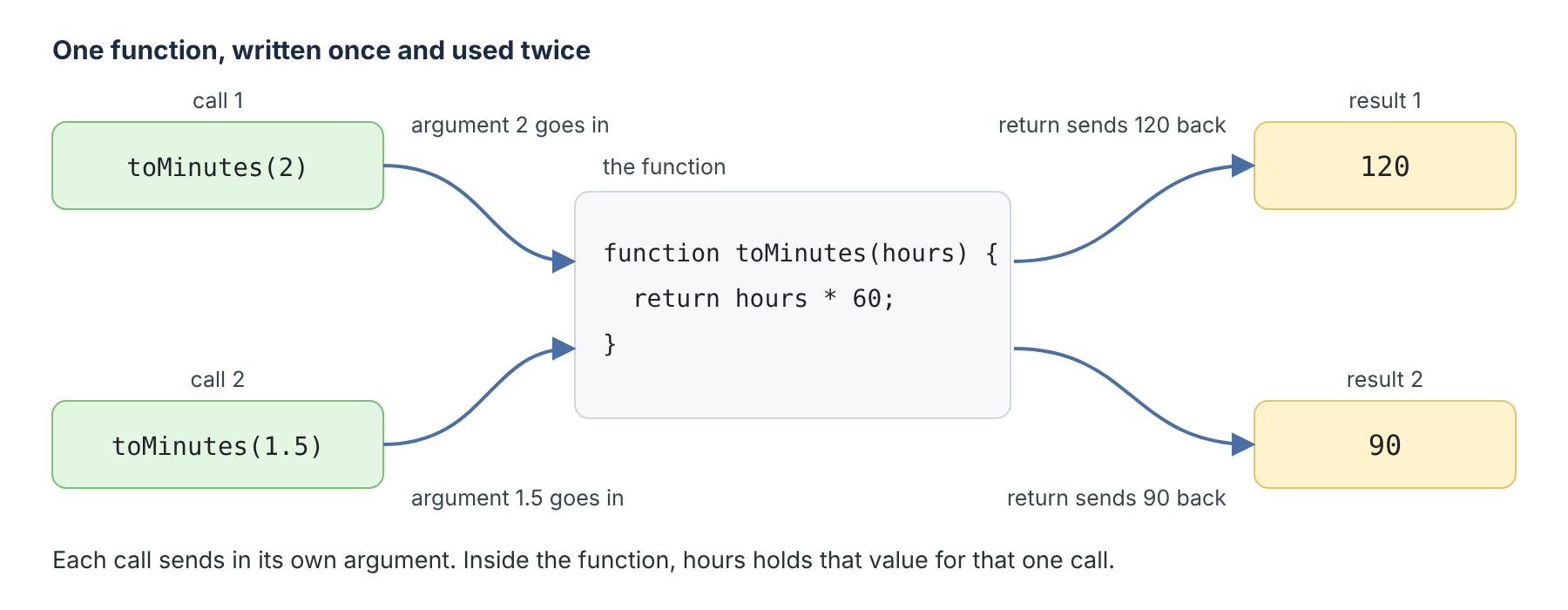
The function is written once and reused. Each call sends its own argument in, and gets its own result back: 120 for the first call, 90 for the second. The word that sends the result back is return, which is Concept 4.
Predict what toMinutes() gives with no argument. Then try it. (You will see NaN, “not a number,” because hours holds undefined and undefined * 60 is not a number.)
4. What does return do, and why is console.log() not the same?
return hands a value back to the line that called the function, and it ends the function right there. console.log() only shows a value on the screen.
A shown value is gone as soon as you read it. A returned value can be stored in a variable, compared, joined to text, or passed to another function. If a function has no return, it still hands something back: undefined. This is the most common mistake at this stage. The function “works” because you see the right text, but the line that called it receives nothing.
Typed into the Console for the picture below, in this order:
function logGreeting(name) {
  console.log("Hello, " + name + "!");
}
function makeGreeting(name) {
  return "Hello, " + name + "!";
}
const a = logGreeting("Sam");
a
const b = makeGreeting("Sam");
b
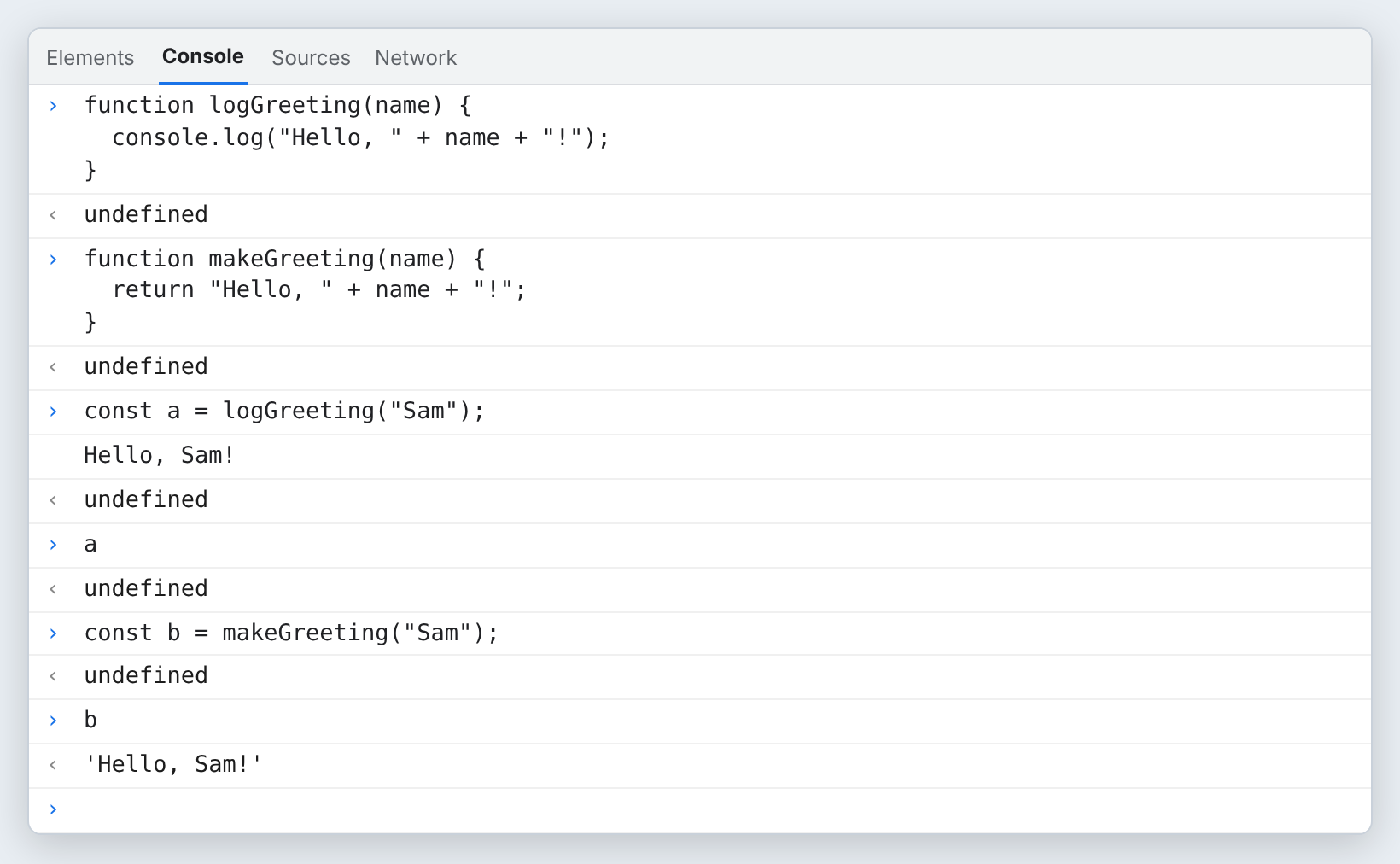
logGreeting shows the text and hands back undefined, so a holds undefined. makeGreeting shows nothing and hands back the text, so b holds 'Hello, Sam!'. (real output, rendered)
In your Console, type makeGreeting("Sam") + " Welcome back." and predict the answer. Then try the same with logGreeting. Why does the second one end in undefined Welcome back.?
5. What is local scope?
A variable created inside a function belongs to that function. Code outside cannot see it. The part of your code where a name can be used is called its scope. A name that works only inside one function has local scope.
MDN’s Functions guide says “variables defined inside a function cannot be accessed from anywhere outside the function.” That is a feature. It means two functions can each have a variable called total without stepping on each other. If you need a value from inside, return it, and store it where you called.
Typed into the Console for the picture below, in this order (word.length gives the number of characters in word; Module 8 covers .length in full):
function countLetters(word) {
  const total = word.length;
  return total;
}
countLetters("website")
total
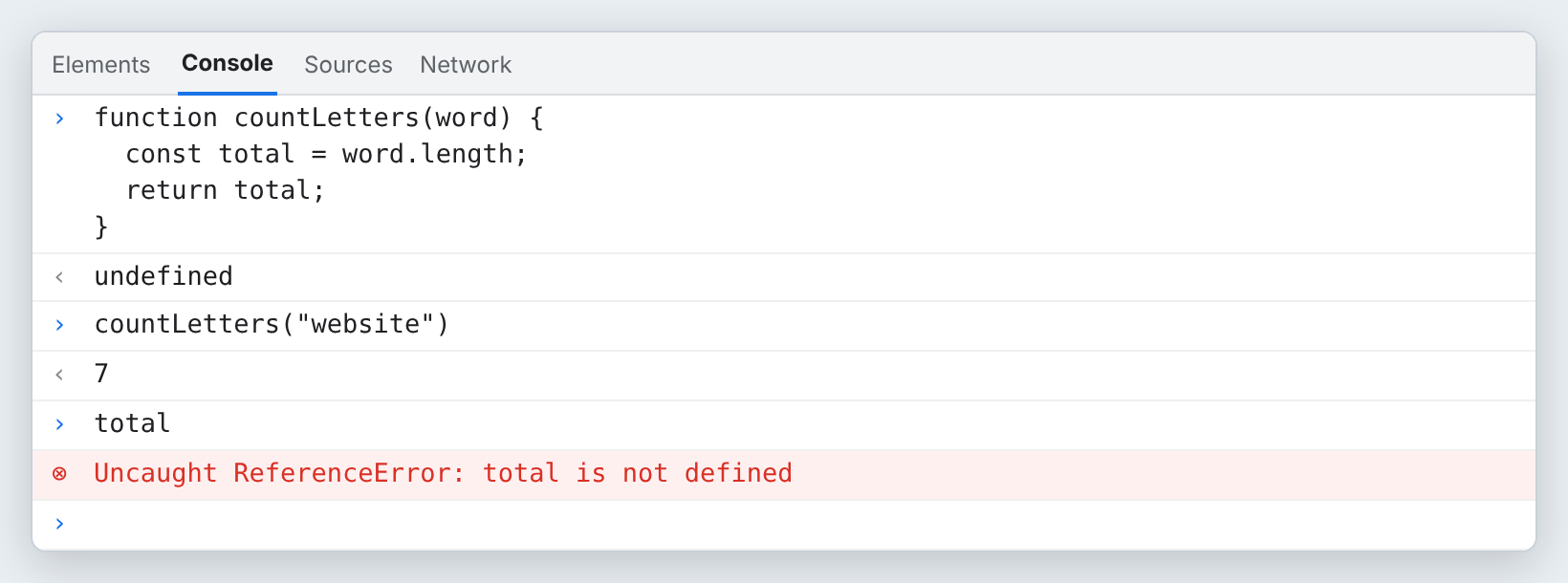
The function used total and handed back 7. Outside, total does not exist, so JavaScript stops with a ReferenceError. (real output, rendered)
Fix it the right way: type const letters = countLetters("website"); and then letters. You get the value without reaching inside.
6. How do you test a function by itself?
You call it with several inputs, one after another, and compare each answer with what you expected.
Pick at least three inputs: a normal one, a different normal one, and an edge. An edge is the value right at a boundary, like 0, an empty string ("", a string with nothing between the quotes), or exactly the limit in an if. Edges are where mistakes hide. In the Console, you type each call. In a file, you put each call inside console.log() and run the file with Node, so the tests can be run again any time.
Here are three tests for countLetters from Concept 5, written in a file. The comment holds the predictions, and the empty string "" is the edge.
function countLetters(word) {
  const total = word.length;
  return total;
}

// expect 7, 2, 0
console.log(countLetters("website"));
console.log(countLetters("Hi"));
console.log(countLetters(""));
When you run this file with Node, it prints 7, 2 and 0, one per line, so all three answers match the predictions.
For toMinutes, write down three inputs and the answer you expect for each before you run anything. That list is your test.
7. How do you write a function from a one-sentence description?
This is the step most learners find hardest, because the description does not tell you where to start. Use the same five steps every time.
Take this description: “Write a function that takes a width in pixels and returns true when it is narrower than 600.”
1. Name it with a verb or a question: isNarrow.
2. List the inputs: one, a width, so one parameter, width.
3. State the output and its type: true or false, a Boolean.
4. Write the test calls first, with the answers you expect: isNarrow(390) → true, isNarrow(800) → false, isNarrow(600) → false (the edge).
5. Write the body last, then run the tests.
function isNarrow(width) {
  return width < 600;
}

Steps 1 to 4 need no code at all. By the time you write the body, you already know what “working” means.
Use the five steps on this description, on paper first: “Write a function that takes a first name and returns a greeting that says Welcome, then the name, then a period (.).”
8. What is the difference between showMessage and showMessage()?
The name alone is a reference to the function. The name with parentheses is a call. They give you two completely different things.
showMessage gives you the function itself, the stored instructions. Nothing runs. showMessage() runs the function and gives you whatever it returns, here a string. You can even store the function itself in another variable and call it later through the new name.
Typed into the Console for the picture below, in this order:
function showMessage() {
  return "Thanks for visiting!";
}
showMessage
showMessage()
typeof showMessage
typeof showMessage()
const later = showMessage;
later()
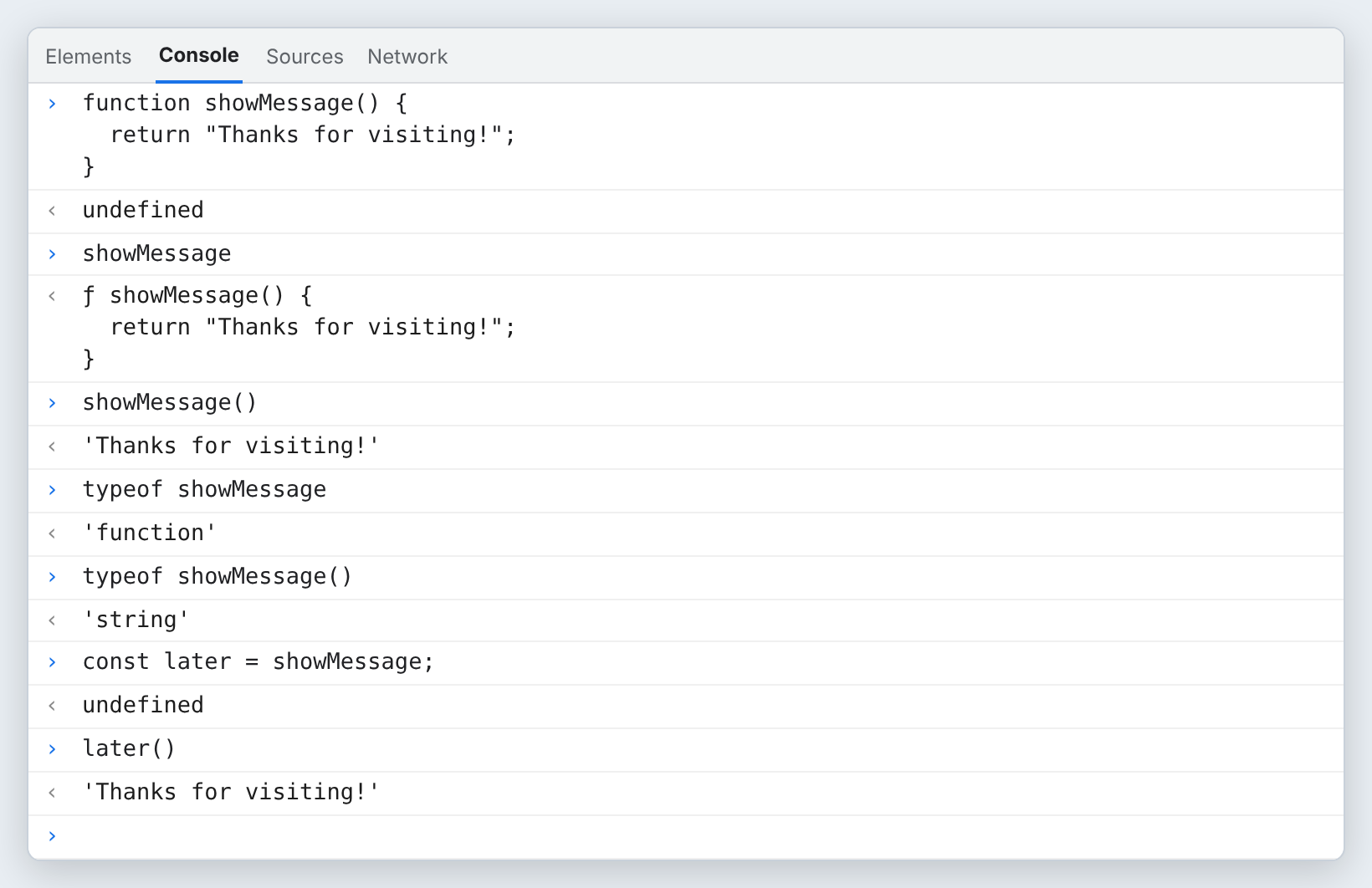
Without parentheses you get the function. With them you get its answer. typeof proves it: 'function' versus 'string'. In Node, console.log(showMessage) prints [Function: showMessage] instead (see the picture in Exercise step 12). (real output, rendered)
This is the bridge to Module 9. There you will tell a button: “when you are clicked, run this function.” The button needs the function itself, so it can call it later, every time someone clicks. It does not need the result of running it once, right now.
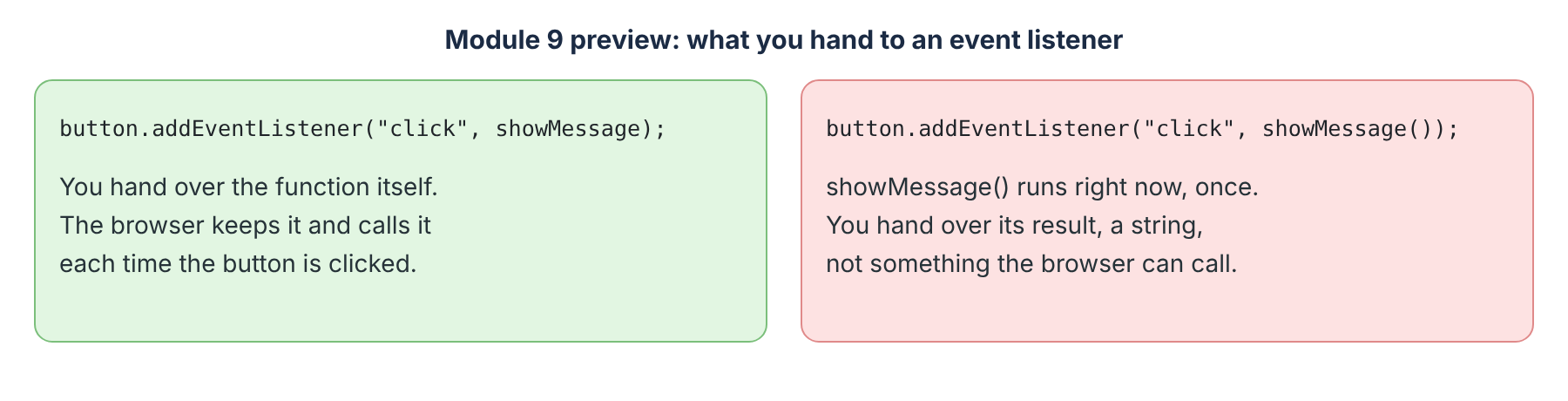
A preview of Module 9. You do not need to type this yet. When we tried the right-hand version in Chromium, it refused with “TypeError: Failed to execute ‘addEventListener’ on ‘EventTarget’: parameter 2 is not of type ‘Object’.” If the function returns nothing, there is no error message at all: the function runs once right away, and later clicks do nothing.
Before you press Enter on each, predict what later and later() will show.
9. How does a function say “there is no answer”?
Sometimes a function is asked a question it cannot answer. It should say so clearly, with a value that means “nothing here.” That value is null.
Both null and undefined mean “no value,” but they have different jobs. undefined is what you get by accident, such as a forgotten return. null is a value you hand back on purpose. The calling code then checks with === null before it uses the answer. Do not use 0 or "" for “no answer”: those can be real answers.
Typed into the Console for the picture below, in this order:
function pickColor(mode) {
  if (mode === "dark") {
    return "#222222";
  }
  if (mode === "light") {
    return "#ffffff";
  }
  return null;
}
pickColor("dark")
pickColor("blue")
pickColor("blue") === null
pickColor("light") === null
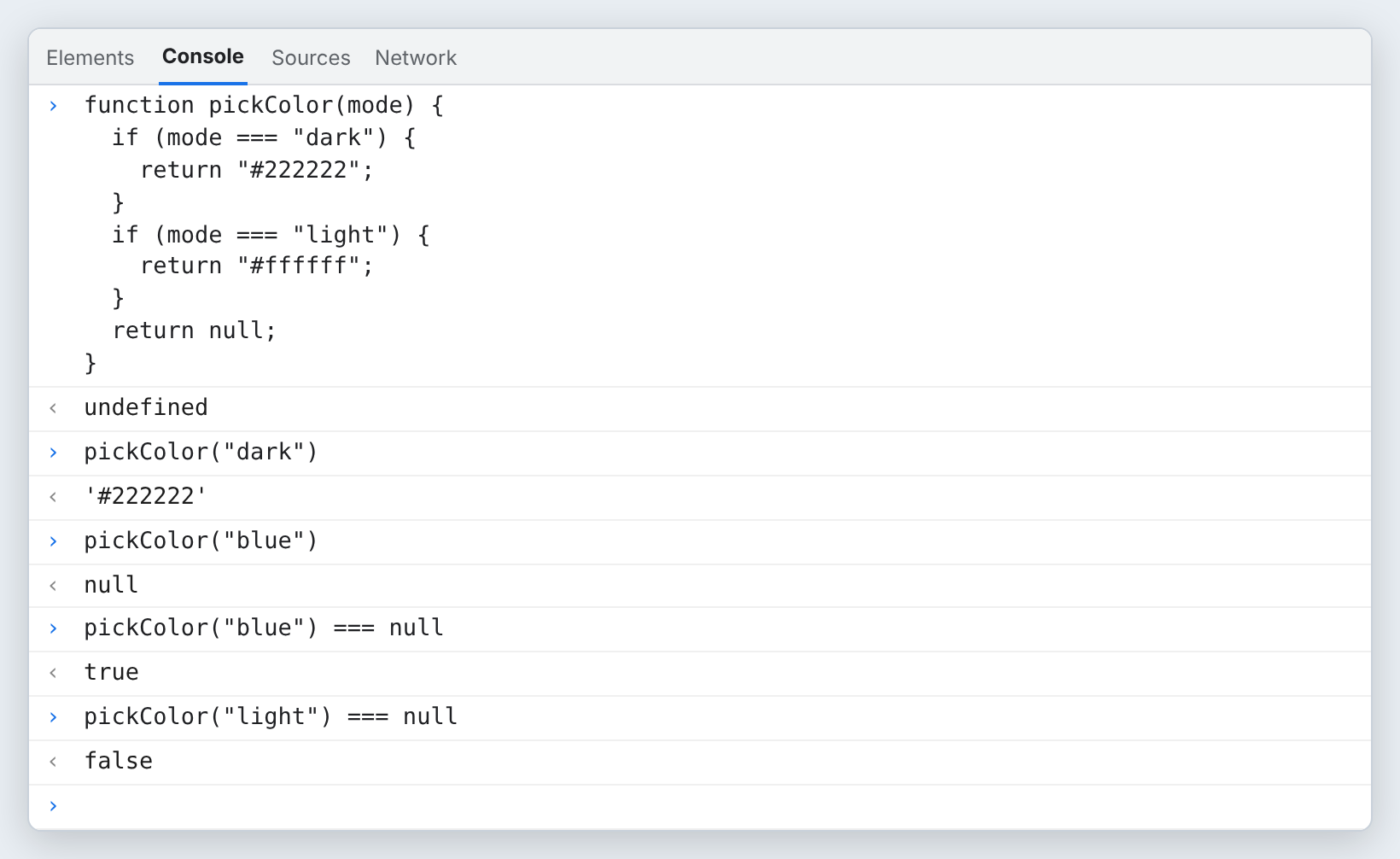
"blue" is not a mode this function knows, so it reaches the last line and returns null. The === null check turns that into a plain true or false you can use in an if. (real output, rendered)
Store an answer first: const color = pickColor("blue");. Then write the if you would put in front of using the color: if (color === null) { … }. What should happen inside it?
Exercise
Your hands, about 45 minutes (estimate). Type it, do not paste it. Work in practice-07. Nothing here is published.
-
Create the file. In VS Code, create
helpers.jsinsidepractice-07. -
Define and test
toMinutes. Type the function from Concept 1. -
Below it, type three test lines:
console.log(toMinutes(2));,console.log(toMinutes(1.5));andconsole.log(toMinutes(0));. -
Write your three predictions in a comment above them, like
// expect 120, 90, 0. -
Run it. Save, then in the terminal type
node helpers.js. Compare each line with your comment. -
Write
isNarrowfrom its description. Use the five steps from Concept 7, in order. At the bottom of the file, write your tests first, as a comment with your predictions:// expect isNarrow(390) true, isNarrow(800) false, isNarrow(600) false. -
Under the comment, type the function.
-
Under the function, type the three
console.logtest lines. -
Run the file again.
-
Reference versus call. Add
showMessagefrom Concept 8. -
Below it, add two lines:
console.log(showMessage);andconsole.log(showMessage());. -
Predict both lines, then run. Your output should now match this picture.
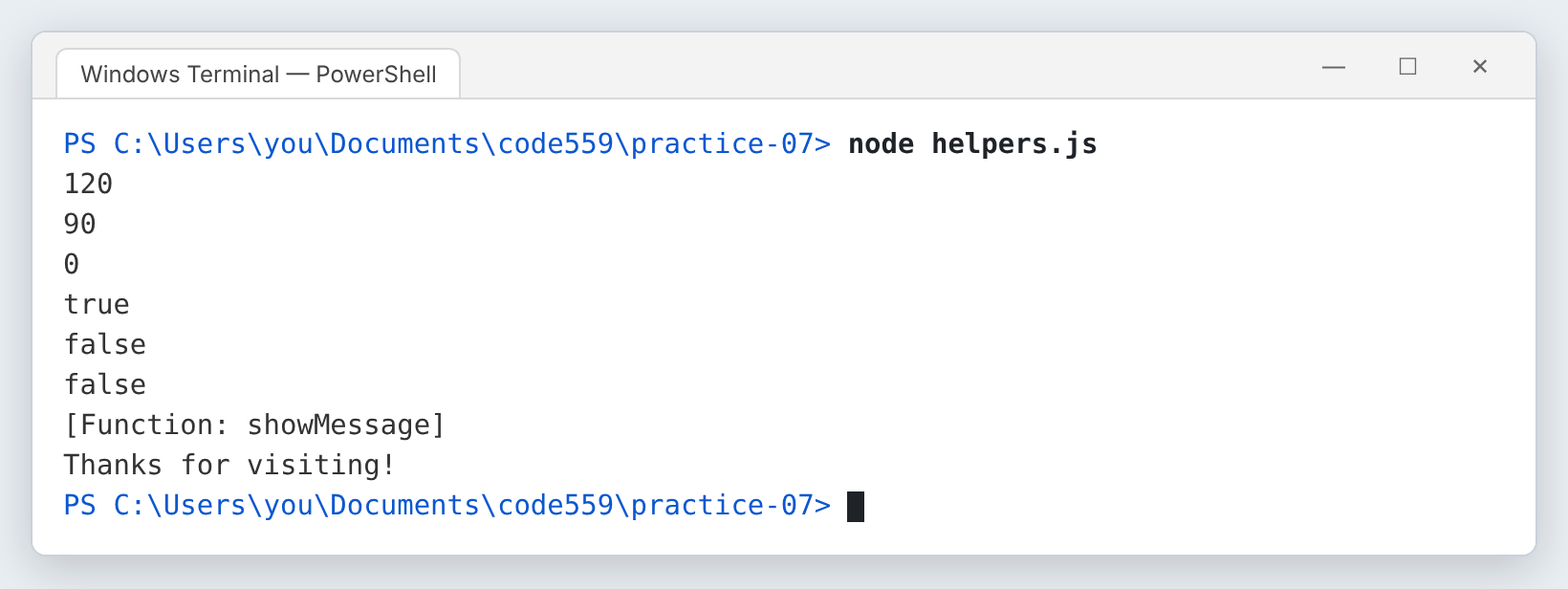
One run, eight answers. The
falseforisNarrow(600)is the edge test: 600 is not less than 600. (real output, rendered; captured on Linux, with the folder path changed to the course folder) -
Break it on purpose. In
toMinutes, delete the wordreturnso the body readshours * 60;. -
Save and run.
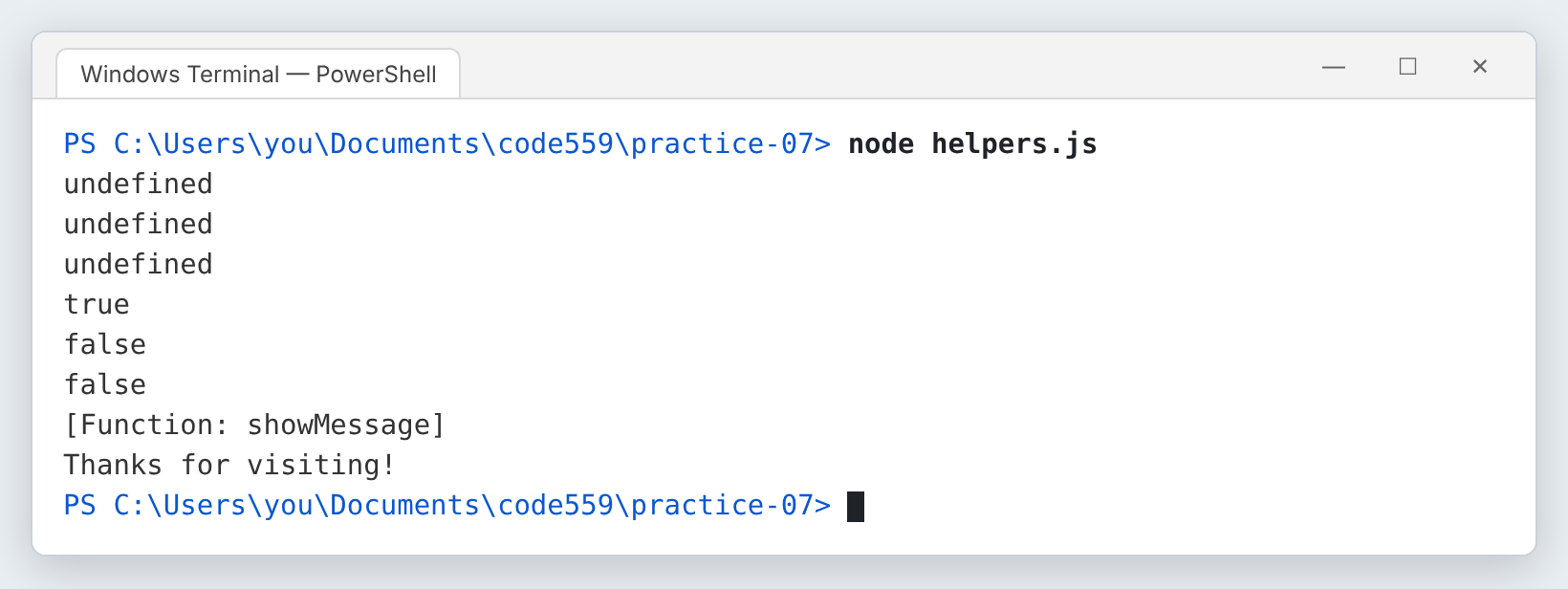
The work
hours * 60still happens, but nothing hands the answer back, so each call givesundefined. No error message. That is what makes this mistake easy to miss. (real output, rendered; captured on Linux, with the folder path changed to the course folder) -
Put
returnback, run once more, and check that 120, 90 and 0 return. -
Scope, in the Console. In the browser Console, type
countLettersfrom Concept 5, then call it. -
Type
total. Read the whole red message. Which word in it tells you the problem? -
Your own. Write one new function from this description, with its tests first: “Write a function that takes a number of minutes and returns true when it is an hour or more.” Include the edge,
60.
Project (in the full packet)
The project is a small, tested helpers.js for your personal site. You write four helper functions from one-sentence descriptions, each with its test calls written first and run in Node: one turns a page name into its file name, one builds the text for a page title, one decides whether a screen width counts as narrow, and one returns null when it is asked about a page your site does not have. In Module 9 you use the same patterns on a web page, where a click runs a function.
The full brief, the step-by-step build, and the finishing work in Git are in the Module 7 packet. Get the packet → (opens in a new tab)
Common misconception
“My function works. I can see the right answer in the Console. Adding
returnis extra work.”
What would you say? Hint: store the result in a variable and look at what the variable holds. Then think about Module 9, where the code that calls your function is not you reading the screen.
Summary
A function is a named, reusable set of instructions. Defining it stores the instructions; calling it with parentheses runs them. A parameter is the name in the definition, and an argument is the value you send in the call. return hands a value back and ends the function, while console.log() only shows a value, so a function that only logs gives undefined to whoever called it. Variables made inside a function stay inside it; outside, they cause a ReferenceError. You test a function by calling it with several inputs, including an edge, and comparing each answer with your prediction. To write a function from a description, name it, list its inputs, state its output, write the tests, and only then write the body. showMessage is the function itself and showMessage() is its result, and an event listener needs the first. A function returns null on purpose when there is no answer, and the caller (the code that called the function) checks with === null.
Check your understanding
const x = logGreeting("Ana");printsHello, Ana!butxholdsundefined. Why?- What is the difference between what you get from
isNarrowand fromisNarrow(390)? - What would you test to be sure
isNarrowis correct right at the boundary? Name the input and the answer you expect.
Before next module
You should now be able to do these on your own:
-
helpers.jsinpractice-07runs withnode helpers.jsand every line matches your predictions - You wrote
isNarrowand the “an hour or more” function with their tests first - You saw
undefinedappear whenreturnwas removed, and put it back - You can explain, without notes, why a listener gets
showMessageand notshowMessage() - If you did this module’s packet project in my-site, saved it with the routine: git status → git add . → git commit -m “…” → git push → check the live page. (Your practice folder is not saved to GitHub.)
You have only been introduced to these so far:
- Handing a function to a button so that a click runs it. You saw this in a picture only. Module 9 uses it for real.
- Returning
nullfor “no answer” and checking with=== null. You tried it in the Console, but not in the Exercise. Module 9 meetsnullagain. .length, which you used insidecountLettersto count the characters in a word. Module 8 covers it in full.- Storing a function under a second name and calling it through that name, as with
laterin Concept 8.
Go further
- MDN: Functions (the JavaScript Guide page) — read “Defining functions,” “Calling functions” and “Function scopes and closures”
- MDN: return (the statement reference page)
- MDN Glossary: Parameter and Argument
- freeCodeCamp: the free JavaScript Certification (checked 2026-10-11) has practice on this topic.
What to keep
Keep helpers.js with its predictions in comments, and your paper notes from the five-step method. Then answer for yourself: which step would be hardest to repeat without this post, and why?
Code559 is a 559 Solutions project. Portions adapted from Visual Studio Code documentation (CC BY 3.0 US), GitHub Docs (CC BY 4.0), and GitHub Skills (MIT). Screenshots used with permission from Microsoft.
Sources checked 2026-10-09: MDN “Functions” (JavaScript Guide); MDN “return”; Chromium (via Playwright) for every Console result and the addEventListener TypeError; Node 22.22.0 for every terminal result. Checked 2026-10-11: MDN “String: length”; MDN “Functions” (section titles); MDN “EventTarget: addEventListener() method” (the listener may be null); Chromium 141 for addEventListener("click", sayHi()) with a function that returns nothing (no error, one run at once, clicks do nothing) and for the Concept 9 Apply; Node 22.22.0 for the countLetters tests in Concept 6. Checked 2026-10-12: Ozubko and MacLeod, “The Production Effect in Memory: Evidence That Distinctiveness Underlies the Benefit,” Journal of Experimental Psychology: Learning, Memory, and Cognition 36(6), 2010 (the footnote on saying code out loud). Checked 2026-11-17: every MDN link in “Go further” opened; MDN Glossary “Parameter”; MDN Glossary “Argument”; MDN “Lexical grammar” (keywords); MDN Glossary “Scope”; MDN Glossary “Local scope”; MDN “EventTarget: addEventListener() method” (what a listener is). toMinutes(2) and toMinutes(1.5) in the new diagram run in Node 22.23.4 (120 and 90).
Footnotes
-
Why out loud? Most people have recited something to learn it by heart: a phone number, a poem, lines for a play. Words you say aloud stick better than words you read silently; memory researchers call this the production effect (Ozubko and MacLeod, 2010). Explaining code to yourself out loud uses the same idea. It also shows you the line you cannot explain yet, and that line is the one to study next. ↩